Show HN: QR Codify, The Most Useful Snippet I've Ever Written(zacharyvoase.com)
zacharyvoase.com
Show HN: QR Codify, The Most Useful Snippet I've Ever Written
http://zacharyvoase.com/2013/03/06/qr-codify/
40 comments
And just for the record: for firefox users there is fox to phone: http://www.foxtophone.com/
Chrome for iOS does this job beautifully :)
Indeed. If only it weren't stuck with a slow js interpreter.
I jailbroke my phone and installed the Nitrous addon to give all apps access to the Nitro engine. Though, i'll admit it's not an option for everyone.
yes, chrome on iOS is unsable because of this. I'd love to use Chrome more, but even lightweight js sites are tediously slow on chrome/ios
Not just the javascript either, Chrome becomes horrendously slow with week wifi signals where Safari is fine. For some reason only Apple apps can do the 3G/LTE/Wifi request pooling magic that they added in iOS 6.
Unusable?! I've been using Chrome on my iPhone 4 for the past week and I haven't noticed a significant difference.
iOS is so last decade :)
Do you guy know something like a "Phone to Chrome"? I'm desperate to find a way to open simply with my desktop Chrome web pages that I stumble upon with my Android but which are impractical to read with it.
You can do this if you use Chrome on your phone, and are signed in with sync enabled. The tabs on your phone are accessible from the 'New Tab' page on you desktop and vice versa. On desktop Chrome, there's a little 'Other Devices' drop down at the bottom; on Chrome for Android, there's a button with a pair of arrows at the bottom right.
Can that work in one direction? I have dozens of tabs open on my desktops, and I don't want to punish my phone with that.
It doesn't open the tabs automatically. Your tabs open on your desktop are listed essentially like bookmarks on your phone. You choose to open them or not at any given time.
The feature is enabled by default so if you're using Chrome already (on both devices, with your Google account), then it's likely already syncing (and clearly not punishing your phone).
The feature is enabled by default so if you're using Chrome already (on both devices, with your Google account), then it's likely already syncing (and clearly not punishing your phone).
That's great! Thank you.
Also check out Push Pop - http://pushpop.herokuapp.com/
You mean like pastefire, the browser plugin that sends text to your iPhone clipboard, that I've been using for years ;)
http://pastefire.com/
Here's what I did to solve this problem. It works on all platforms/all phones/all browsers.
I created a document using TitanPad (http://titanpad.com/) -- any paste bin service will do. I then bookmarked that document on all my computers and phones. I called the bookmark 'Text Sync'.
Bonus if your favorite paste bin supports versioning. You can use secure Gists if you've got some private text to pass around.
I created a document using TitanPad (http://titanpad.com/) -- any paste bin service will do. I then bookmarked that document on all my computers and phones. I called the bookmark 'Text Sync'.
Bonus if your favorite paste bin supports versioning. You can use secure Gists if you've got some private text to pass around.
This is exactly the kind of thing that Apple will likely implement one day as seamless integration is their speciality.
They haven't done anything with text yet but there's iCloud Tabs for URLs. Anything you have open in Safari is available on your iPhone/iPad too and anything on those devices is available by clicking the cloud icon in Safari.
Nice work! This inspired me to create an Automator service for pretty printing JSON.
http://random-seeds.tumblr.com/post/44730735573/a-useful-os-...
http://random-seeds.tumblr.com/post/44730735573/a-useful-os-...
How do I make the "Services" submenu show up in the right click menu?
Here is also URL to QR Bookmarklet: http://www.vcarrer.com/2012/06/url-to-qr-bookmarklet.html
Been meaning to look into Automator ever since I got my mac. Does anyone have a good guide on all the features available?
If you have an iPhone and Mountain Lion, you can just pass messages between devices via the Notes apps and iCloud.
Can services be used on Firefox for Mac? It doesn't show up on my right click context menu.
Now go generate tons of QR codes and scan them all with Qriket to earn money.
can i get that in ascii please?
used qrencode and img2txt to get ascii.
I followed your lead, but I didn't like the way the img2txt looked. I just wanted black and white.
Then I saw it was unnecessary, qrencode provides ANSI support.
Then I saw it was unnecessary, qrencode provides ANSI support.
echo foobar |qrencode -tANSI -o- #grey, blech
echo foobar |qrencode -tANSI -o- | sed -e "s/\[47m/\[0\;5\;37\;47m/g" -e "s/\[40m/\[0\;34\;40m/g"
echo foobar |qrencode -tANSI256 -o- # pretty, yay
echo foobar |qrencode -tANSI256 -o-|sed -e "s/ / /g;p"
I've found them horribly useful for passing authentication tokens from desktop to mobile devices. It means that you can move tokens without having to type enormous screens or go through a normal login form.
They're even pretty if you embed them with a bitmap using QArt — http://research.swtch.com/qart
They're even pretty if you embed them with a bitmap using QArt — http://research.swtch.com/qart
QR codes on billboards and in marketing are kind of rubbish, but in terms of moving a URL or a phone number from your PC to your phone quickly, they're actually pretty useful.
QR codes on billboards and in marketing are kind of rubbish
On a big billboard beside the freeway, sure. In a home for sale sign, or in a bus shelter, or anywhere else where people are either a) very interested or b) captive, they are fantastic.
On a big billboard beside the freeway, sure. In a home for sale sign, or in a bus shelter, or anywhere else where people are either a) very interested or b) captive, they are fantastic.
The best place I've seen QR codes is on the tube.
Because hey, I'mma scan this QR code, and then remember about it when I'm topside.
Because hey, I'mma scan this QR code, and then remember about it when I'm topside.
My favourite QR code use was from the tube: https://pbs.twimg.com/media/AneZAsiCAAATy1Q.jpg:large
Keep your phone hidden (but check out this QR code!)
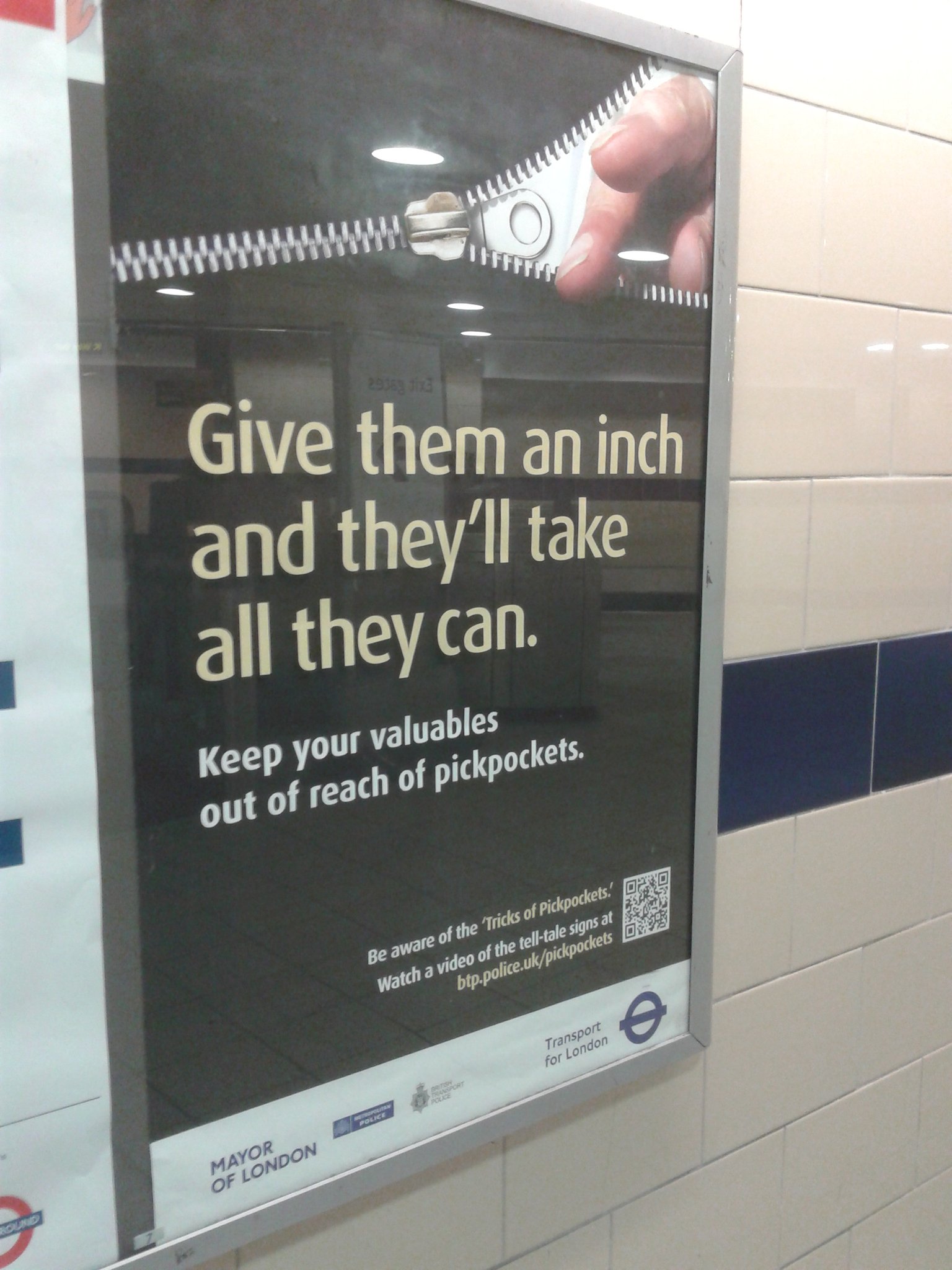
Keep your phone hidden (but check out this QR code!)
> check out this QR code!
Instead of trying to scan that QR code (in a corner of a billboard), here's the URL: http://www.btp.police.uk/pickpockets/
Instead of trying to scan that QR code (in a corner of a billboard), here's the URL: http://www.btp.police.uk/pickpockets/
Unless you can share your clipboard between them, which works even better.
nope, i run http://miniqr.com for that exact reason, and lets just say, it never took off (and nobody uses is that way)
What determined the outcome of your service was the convenience factor. To use it, the user needs to select the information, go to your webpage, and then submit it. It's too much work for the user.
OP's program removes 1/3rd of the steps, making it much easier for the user.
OP's program removes 1/3rd of the steps, making it much easier for the user.
That site also looks pretty unfriendly.
I find it useful, it just needs to be easier on phones to get to the qr code scanner. I use an iphone, and if it was as easy as just opening up the camera app, pointing at the code which it recognized and put a box around (similar to the focus box perhaps) that I could click on, it would go a long way to getting more people to use them.
This gets posted in every qr code topic. You can't deny QR Codes are popular in Japan and Korea...
You can store WiFi access point credentials in a QR code:
http://www.qrzilla.com (click WiFi)
Great hack. Another way to get text quickly to your phone, if you have an iPhone, is to send yourself a message on Messages.
Well, that's actually a pretty nice idea
Maybe you can sign up for an SMS broker and send SMSs if you don't have a Mac (it's less expensive than you think)
Maybe you can sign up for an SMS broker and send SMSs if you don't have a Mac (it's less expensive than you think)
I just email myself. That works on any combination of computer/phone OSs :)
Can't do that with a password or other sensitive info.
I have a web server that only responds to requests from my LAN. I put sensitive info into an HTML file there, then point my phone's browser to it to copy/paste it; then I delete the info from the file. This way the data never leaves my LAN, which I believe is reasonably well protected.
I have a web server that only responds to requests from my LAN. I put sensitive info into an HTML file there, then point my phone's browser to it to copy/paste it; then I delete the info from the file. This way the data never leaves my LAN, which I believe is reasonably well protected.
And if you have a Mac.
[deleted](2)
I've been using a Chrome extension I created for the same purpose. The nice part is that it does it without making an external web request, using javascript and canvas.
Also, iPhone users should check out the Scan app[1] for a QR code reader. It's by far the fastest starting, simplest QR scanner I've been able to find; Most of the other apps seem to be cramming in price-checking features and have butt-ugly icons.
[1]: http://scan.me
Also, iPhone users should check out the Scan app[1] for a QR code reader. It's by far the fastest starting, simplest QR scanner I've been able to find; Most of the other apps seem to be cramming in price-checking features and have butt-ugly icons.
[1]: http://scan.me
I also created a chrome extension, without web requests :)
https://github.com/fabriceleal/chrome-extension-url-qr-encod...
https://github.com/fabriceleal/chrome-extension-url-qr-encod...
If it's speed you're looking for, check this out:
http://news.ycombinator.com/item?id=5016497
http://news.ycombinator.com/item?id=5016497
Just keep in mind that Google's QR Code (Infographic) API has been deprecated.
Been using http://code.google.com/p/pyqrnative/
Yeah, I was about to add that too. Sad, but fun to play with until it is gone ;)
You can do it locally with qrencode[1], which is available via MacPorts and Homebrew. It would probably simplify the script, too (especially if converted to bash).
On an X11 environment, I can select some text and get the same results on the command line with something like:
[1] http://fukuchi.org/works/qrencode/
Edit: No need for temporary file
On an X11 environment, I can select some text and get the same results on the command line with something like:
xsel | qrencode -o - | feh -FZ
[1] http://fukuchi.org/works/qrencode/
Edit: No need for temporary file
You can use pbpaste on OS X in place of xsel.
For Android users there is the Chrome to Phone extension which uses Web Intents. No need to scan a QR code. You can directly send selected text, web links, phone numbers or map links to your phone.
https://chrome.google.com/webstore/detail/google-chrome-to-p...
if you like URL "hacking" you can do something like this
after looking at the market fo QR codes now for 4 years, i don't think i will get rich with just that side project. QR codes just do not fulfill any use case for users (they fulfill a use case for content publishers and advertisers, but non for users)
p.s.: if you want to (really) see people scanning QR codes, there is a page for that, too http://replycam.com/browse.php
  http://miniqr.com/http://www.example.com/
  http://miniqr.com/"hello world"
after looking at the market fo QR codes now for 4 years, i don't think i will get rich with just that side project. QR codes just do not fulfill any use case for users (they fulfill a use case for content publishers and advertisers, but non for users)
p.s.: if you want to (really) see people scanning QR codes, there is a page for that, too http://replycam.com/browse.php
For me, it was more about sticking the whole process in an OS X Service available by right-click than actually generating a QR code. Of course you could also write one that sends a text message (via Twilio perhaps), or beams something over Bluetooth.
Why is replycam all QR codes? What am I missing?
http://miniqr.com/reader.php uses the replycam flash camera (i own both sites, so i don't care)
Is there a warning for people snapping QR codes to let them know their photos are being saved on replycam?
Cool, I like it and would use it daily. I sometimes use dropbox like a pastebin for same thing.
QR Code transfer is probably patent encumbered (like well almost everything).
Nokia has app to do this but in reverse. Look at photo gallery on phone in their app. When you find picture you want to see, open browser on desktop and see QR code. Point camera at screen and the QR code in browser is replaced by image from phone.
http://conversations.nokia.com/2012/11/30/photobeamer-the-ma...
QR Code transfer is probably patent encumbered (like well almost everything).
Nokia has app to do this but in reverse. Look at photo gallery on phone in their app. When you find picture you want to see, open browser on desktop and see QR code. Point camera at screen and the QR code in browser is replaced by image from phone.
http://conversations.nokia.com/2012/11/30/photobeamer-the-ma...
According to Wikipedia, QR code is free of any license.
http://en.wikipedia.org/wiki/QR_code
http://en.wikipedia.org/wiki/QR_code
Indeed; in order for any standard like this (or UPC, EAN, etc) to gain widespread usage as opposed to very narrow, single-organization usage, it has to be EASY to adopt.
This means that while the standard's official documentation might require that it be purchased (this is the case with QR), or while software which interacts with it might not be free/gratis, it must not carry with it patent or licensing encumberances. While ISO allows "reasonable and non-discriminatory" patents/licenses to be enforced against technologies which are ISO standards, something like a barcode format is difficult to justify licensing restrictions in almost all cases.
This means that while the standard's official documentation might require that it be purchased (this is the case with QR), or while software which interacts with it might not be free/gratis, it must not carry with it patent or licensing encumberances. While ISO allows "reasonable and non-discriminatory" patents/licenses to be enforced against technologies which are ISO standards, something like a barcode format is difficult to justify licensing restrictions in almost all cases.
you can still patent applications of it.
I created a bookmarklet that does the same thing for any website you're browsing. Makes it easy to transfer from PC to phone, assuming the phone can read QR codes.
http://keyboardp.tumblr.com/post/38976790879/send-webpage-fr...
http://keyboardp.tumblr.com/post/38976790879/send-webpage-fr...
Would be even more useful if it could QR-ify any currently select text. I was just thinking of doing that myself.
Ok, done it. Try this:
https://gist.github.com/findel/5099737
Credit for the selection code: http://stackoverflow.com/questions/4652734/return-html-from-...
[Edit: created gist]
https://gist.github.com/findel/5099737
Credit for the selection code: http://stackoverflow.com/questions/4652734/return-html-from-...
[Edit: created gist]
Nice, thanks! Added to my bookmark bar :)
I can't recommend http://pushbullet.com enough... it allows you to send anything to your phone and works very well.
Thx, bonus points for the API
here's something intended to serve roughly the same purpose for iOS/Mac: http://www.getbeamapp.com/
this looks great but both apps are free. once we have the apps how do they make money?
QR sounds useful for some minor applications, but for anything serious placed in a public place on a physical medium (like a billboard) its a phishers dream: just put a sticker with your phishing url over the original one and noone will ever realise.
I remember temporarily sticking an A4-sized QR code linking to a mild shock image on my desk at my old job and tweeting a photo of said desk to see who I'd get a reaction from.
I'm using a zsh function with similar functionality for exactly the same purpose:
    qrdisplay () {
	qrencode -o - "$1" | display
}I read through the comments, expecting to see a JS version of this, but I didn't find one so I made it:
Edit: Added missing apostrophe.
javascript:(function(){ var i = new Image();i.src = 'http://chart.apis.google.com/chart?cht=qr&chs=300x300&chl='+ encodeURIComponent(getSelection());i.onclick=function(){i.parentNode.removeChild(i)};i.setAttribute('style', 'position:fixed;top:50%;left:50%;margin:-150px 0 0 -150px;box-shadow:0 0 20px rgba(0,0,0,0.2)');document.body.appendChild(i)})();
Edit: Added missing apostrophe.
Missing a closing apostrophe.
javascript:(function(){var a=new Image;a.src="http://chart.apis.google.com/chart?cht=qr&chs=300x300&chl="+encodeURIComponent(getSelection());a.onclick=function(){a.parentNode.removeChild(a)};a.setAttribute("style","position:fixed;top:50%;left:50%;margin:-150px 0 0 -150px;box-shadow:0 0 20px rgba(0,0,0,0.2)");document.body.appendChild(a)}());That's pretty awsome, Better than mine: https://gist.github.com/findel/5099737
[deleted]
I've been using something roughly the same as this for a few months. Surprisingly handy, especially since you can use it to send URLs to just about any device.
Fortunately, OS X now has Services
http://en.wikipedia.org/wiki/Services_menu
Yeah, that sentence should have been "Fortunately, I just discovered services on OS X".
Great idea! Never knew about the Automator. That got me inspired to create a HN Search service for myself: http://news.ycombinator.com/item?id=5331370
My solution here is usually to just send myself a text message from Google Voice. For me, it's faster to open a new tab and paste my text than to find my QR reader and scan.
There's also a few apps that can copy and paste between devices. I use Any Send to pass links and PDF's around.
I love the hacker in you. :)
If you want to read the QR codes just as quickly on your iOS device, check this out:
http://news.ycombinator.com/item?id=5016497 http://youtu.be/HQNB9XZdPCk
http://news.ycombinator.com/item?id=5016497 http://youtu.be/HQNB9XZdPCk
Use pastebot from tapbots (authors of tweetbot) for this sort of thing personally. http://tapbots.com/software/pastebot/
brew install qrencode
http://fukuchi.org/works/qrencode/index.html.en
http://fukuchi.org/works/qrencode/index.html.en
Nice. I've built a web app that pushes a mobile provisioning profile to iOS devices with your wifi ssid & password - lets people easily jump on your wifi
Works with Redlaser only as most QR code readers open web links in a viewport instead of pushing out to safari.
http://www.getonmywifi.com
Works with Redlaser only as most QR code readers open web links in a viewport instead of pushing out to safari.
http://www.getonmywifi.com
Interesting. I wonder if there's a way for you get around having to actually host the profile, perhaps via some unconscionably long "javascript:" URL that creates the mobileconfig document and "downloads" it. Red Laser doesn't seem to recognize "javascript:..." as an openable URL, but maybe there's a way around that.
Interesting thought. I'll have to investigate, thanks.
What would make this perfect, is a "QR Keyboard" that reads from the QR code and dumps it into any other input field.
> Fortunately, OS X now has Services
This has been a feature for OS X for a long, long time.
This has been a feature for OS X for a long, long time.
[deleted](1)
Google's chart API also supports ssl: https://chart.googleapis.com/chart?cht=qr&chs=300x300...
Since the selected text is sent to Google in plain text via a regular HTTP connection, you shouldn't use it on confidential data.
I saw this, thought "yeah right, gonna be more of a pain than depicted, why bother", downloaded & installed it anyway because I've got a stupid fondness for the idea (if not the awkward reality) of QR codes ... and not 2 hours later was using it for real. Dang handy, nicely implemented.
Thanks!
Only quibble is: how big a code can this viably render? tried something not particularly large for fun and just got a big "PNG" icon instead.
Thanks!
Only quibble is: how big a code can this viably render? tried something not particularly large for fun and just got a big "PNG" icon instead.
Thanks a lot! It's feedback like this that keeps me releasing this stuff for free :P
In terms of size: I think QR codes go up to 1024 bytes; anything larger and perhaps the Google Chart Image API would return an error, so you'd be quicklooking an empty file with a '.png' suffix, hence the generic PNG icon.
The next evolution of this script is to store larger text strings in a pastebin and then just display a QR code for the URL to that.
In terms of size: I think QR codes go up to 1024 bytes; anything larger and perhaps the Google Chart Image API would return an error, so you'd be quicklooking an empty file with a '.png' suffix, hence the generic PNG icon.
The next evolution of this script is to store larger text strings in a pastebin and then just display a QR code for the URL to that.
Edit: Still a cool extension you've got there! Not taking anything away from it.