Advanced vim tips and tricks(cs.swarthmore.edu)
cs.swarthmore.edu
Advanced vim tips and tricks
http://www.cs.swarthmore.edu/help/vim/
10 comments
Not really "advanced": most of this is pretty basic - includes cursor movement, searching as well as some more interesting stuff.
Basic or not, this is a fine collection of VIM patterns. While vim help is OK but far from usable, it's just too long to read without a proper formatting. This site is just the opposite, short and easy to navigate tips, quite handy as a reference.
Don't get me wrong - it's not a bad collection. I'm just commenting on the HN headline.
The OSS book, Vim Recipes is really great as well, and if you know something that isn't on there just fork it and push it yourself.
Here's another one a Byte of Vim, also free on a CC license, but not as good as the Vim Recipes I've found.
Here's another one a Byte of Vim, also free on a CC license, but not as good as the Vim Recipes I've found.
Vim Recipes:
http://vim.runpaint.org/toc/
A Byte of Vim: http://www.swaroopch.com/notes/Vim
This cheatsheet has worked really well for me: http://www.viemu.com/vi-vim-cheat-sheet.gif
A Byte of Vim: http://www.swaroopch.com/notes/Vim
This cheatsheet has worked really well for me: http://www.viemu.com/vi-vim-cheat-sheet.gif
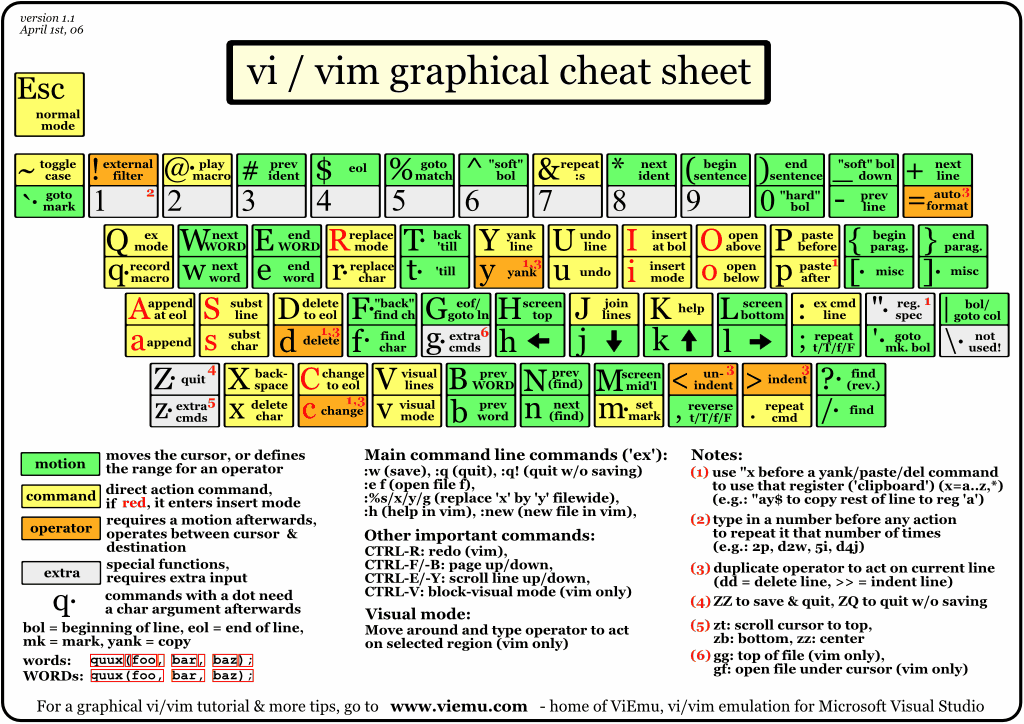
Vim's :help is extensive. Try :help quickref.
vimtutor is good for getting started too.
vimtutor is good for getting started too.
I love vim. That's all I have to share.
Some other great vim resources:
Vim tips wiki: http://vim.wikia.com/wiki/Main_Page
The best collection of vim scripts: http://www.vim.org
#vim on freenode
Vim tips wiki: http://vim.wikia.com/wiki/Main_Page
The best collection of vim scripts: http://www.vim.org
#vim on freenode
gg -> go to the top of the file.
G -> go to the bottom.
:set splitright -> makes :vs open the file on the right
:set splitbottom -> makes :sp open on the bottom
Ctrl-w cycles through split windows. Ctrl-[h,j,k,l] goes to the window in that direction [left, down, up, right].
When either :vs or :sp are invoked without filenames, they open the current buffer. Very useful for looking at 2 sections of the same file at once.
:tabe [file] -> how could this get forgotten? Opens the file in a new tab.
:set number -> shows line numbers.
[Line#]G -> jumps to that line.
O -> capital oh, inserts a blank line above the current line and goes into insert mode. Perfect for comments.
:set ic -> ignores case for searching, usually useful. :set noic makes searching case sensitive again. (:set no[setting] turns that setting off)
:set lbr -> visual word wrap.
Text objects are also damn cool. In visual mode (v):
i" -> selects the contents of quotes.
i( -> select the contents of parens.
i[ -> selects the contents of square brackets.
i{ -> selects the contents of curly brackets.
Using a instead of i for the above commands selects the delimiter also.
>> -> indents. << does the opposite.
% -> goes to matching paren/bracket. Great for debugging.
* -> go to next instance of current word. # to go to previous instance. Good for cycling through function definitions.
Edit: formatting, more commands.