Visual Studio 2017 What's New Poster(blogs.msdn.microsoft.com)
blogs.msdn.microsoft.com
Visual Studio 2017 What's New Poster
https://blogs.msdn.microsoft.com/visualstudio/2017/03/13/visual-studio-2017-poster/
48 comments
The "web infographic" version is much more readable... in a web broswer: https://vs2017poster.azurewebsites.net/
Yeah, when they say "poster", they're not kidding. I imagine the one-pager is gonna be impossibly hard to read unless you have a printer that can handle 24"x36" or larger.
Back when they had the first SQL Server version after the Sybase deal, I think it was version 6.5, we got a full wall poster containing a description of all metadata tables sent to us, along the usual pile of MSDN CDs.
Glad to see their graphic design internship program is alive and well...
serving pdfs to the web like no other
link to the gigantic image (displayed quite tiny on the site and after a slow load just linking to the pdf): https://msdnshared.blob.core.windows.net/media/2017/03/Visua...
link to the gigantic image (displayed quite tiny on the site and after a slow load just linking to the pdf): https://msdnshared.blob.core.windows.net/media/2017/03/Visua...

I use Visual Studio every day these days.
Honestly, I wish it would do less, but a lot better. Rather than adding new features, I would love to see the following addressed:
- 64-bit by default. I am developing for Windows 10, make the entire C# toolchain emit 64-bit binaries. Make devenv.exe 64-bit, make the default build/compile 64-bit
- Make the XAML editor work without bombing out in not-that-unreasonable scenarios.
- Make it faster. Everywhere. Make project startup faster, make static analysis faster, make the compiler faster.
I don't use probably 90% of what it does. You're never going to convince me VS is a better tool for deployments, managing databases, or the approximately 50 other things it tries to do, better than purpose-built, scriptable tools. Just make a fast, purpose-built code editor with good static analysis capabilities, and get out of my way. FWIW, I'm really liking Visual Studio Code these days, it's more in line with what I want.
Honestly, I wish it would do less, but a lot better. Rather than adding new features, I would love to see the following addressed:
- 64-bit by default. I am developing for Windows 10, make the entire C# toolchain emit 64-bit binaries. Make devenv.exe 64-bit, make the default build/compile 64-bit
- Make the XAML editor work without bombing out in not-that-unreasonable scenarios.
- Make it faster. Everywhere. Make project startup faster, make static analysis faster, make the compiler faster.
I don't use probably 90% of what it does. You're never going to convince me VS is a better tool for deployments, managing databases, or the approximately 50 other things it tries to do, better than purpose-built, scriptable tools. Just make a fast, purpose-built code editor with good static analysis capabilities, and get out of my way. FWIW, I'm really liking Visual Studio Code these days, it's more in line with what I want.
Have you tried VS Code (https://code.visualstudio.com/) with the right plugins it might be exactly what you're after...
On the "faster" claim, you may miss it with all the visual noise but on the blog posts they boast noticeable speedups, although I didn't see any quantification.
Item #9 from an earlier release announcement says "starting up, loading projects and building": https://blogs.technet.microsoft.com/uktechnet/2016/11/29/vis...
There's a five part blog series on performance improvements in VS2017 (then codenamed version "15"), here: https://blogs.msdn.microsoft.com/visualstudio/2016/10/14/imp...
Visual Studio release system requirements with every version (I believe):
https://www.visualstudio.com/en-us/productinfo/vs2017-system...
But it would be good to know what their actual developers use - as I see people complaining about Visual Studio lag all the time. Perhaps if they simply stated: SSD recommended, or our developers use XYZ in their builds - it would help individuals and organisations know what hardware is key to perfect performance.
I can't imagine devs at MS put up with lag when developing their software - so assume it's well known what hardware matches well with VS.
https://www.visualstudio.com/en-us/productinfo/vs2017-system...
But it would be good to know what their actual developers use - as I see people complaining about Visual Studio lag all the time. Perhaps if they simply stated: SSD recommended, or our developers use XYZ in their builds - it would help individuals and organisations know what hardware is key to perfect performance.
I can't imagine devs at MS put up with lag when developing their software - so assume it's well known what hardware matches well with VS.
The interesting part is that this lame 2012 laptop, dual core with 8 GB and HDD, can execute VS 2015 without any major issue, but I get the fan full speed when using Android Studio instead.
They've also gotten rid of the ISO installer which is making enterprise deployment a real pain.
What about volume licensing? We've been waiting a few days and nothing is showing up.
Out of curiosity, why is an ISO installer useful for enterprise deployment? I'd have thought an MSI would be much more useful....
The "official" way is to use a janky installer with a tonne of parameters and no real way to tell if you've got all the files until you try to install. With an ISO, at least you're starting from a known good base when you repackage things.
I don't think Visual Studio has ever been an MSI, by the way.
I don't think Visual Studio has ever been an MSI, by the way.
There are good reasons for it. I hope a sysadmin isn't afraid of some parameters. We've been waiting a very long time for a minimal/piecewise install capable Visual Studio.
Yeah, no fear here, except none of those parameters set any kind of logging and there's no way to tell if the download completed successfully (yay Australian Internet)
How does such a deployment scenario work? Are there devs out there who would agree to not set up their IDE themselves? The VS installer has one million optional components, and every dev needs a different set...
Yes, typical enterprise IT.
You get a development workstation configured by IT with the standard tooling allowed inside the company.
Regarding Visual Studio, it usually means a full install of professional version, or with luck the enterprise version for those with architect role.
Getting any software for development not configured out of the box by IT, usually means opening a ticket requesting the installation, alongside the reason why it is required and occasionally the corresponding cost center as well.
You get a development workstation configured by IT with the standard tooling allowed inside the company.
Regarding Visual Studio, it usually means a full install of professional version, or with luck the enterprise version for those with architect role.
Getting any software for development not configured out of the box by IT, usually means opening a ticket requesting the installation, alongside the reason why it is required and occasionally the corresponding cost center as well.
> Yes, typical enterprise IT.
I thought that didn't apply to devs - even in a 10k people org. Doesn't this just create a massive overhead?
Aren't people going to require modifying this setup regularly? (oh now I need the .NET 4.6.2. targeting pack, tomorrow it's the MsBuild 12.0 tools and next week it'll be the SDK for Win10 developers update (They release one SDK update per Win update!).
> Getting any software for development not configured out of the box by IT, usually means opening a ticket requesting the installation, alongside the reason why it is required and occasionally the corresponding cost center as well.
It feels like a massive administrative overhead if you have to raise IT support tickets in order to modify a VS installation. This all feels like a maintenance nightmare. I can't imagine the alternative being worse (1000 devs maintaining 1000 different types of computers themselves).
I thought I was in a large "enterprise-y" situation - but apparently I'm not. I'm at least trusted to face the VS installer on my own.
I thought that didn't apply to devs - even in a 10k people org. Doesn't this just create a massive overhead?
Aren't people going to require modifying this setup regularly? (oh now I need the .NET 4.6.2. targeting pack, tomorrow it's the MsBuild 12.0 tools and next week it'll be the SDK for Win10 developers update (They release one SDK update per Win update!).
> Getting any software for development not configured out of the box by IT, usually means opening a ticket requesting the installation, alongside the reason why it is required and occasionally the corresponding cost center as well.
It feels like a massive administrative overhead if you have to raise IT support tickets in order to modify a VS installation. This all feels like a maintenance nightmare. I can't imagine the alternative being worse (1000 devs maintaining 1000 different types of computers themselves).
I thought I was in a large "enterprise-y" situation - but apparently I'm not. I'm at least trusted to face the VS installer on my own.
> Aren't people going to require modifying this setup regularly? (oh now I need the .NET 4.6.2. targeting pack, tomorrow it's the MsBuild 12.0 tools and next week it'll be the SDK for Win10 developers update (They release one SDK update per Win update!).
No, because you are only allowed to do that if project requirements do actually need those updates.
You never do that alone, it is done for all devs working on that specific project.
> I thought I was in a large "enterprise-y" situation - but apparently I'm not. I'm at least trusted to face the VS installer on my own.
Well, I work on consulting for large enterprises Fortune 500, DAX 30, and similar corporations.
The level of freedom we get on the computers assigned to us, depends pretty much on the customer, their security processes, vendor management processes, and how their internal IT is set up.
Not all customers have such tight control.
No, because you are only allowed to do that if project requirements do actually need those updates.
You never do that alone, it is done for all devs working on that specific project.
> I thought I was in a large "enterprise-y" situation - but apparently I'm not. I'm at least trusted to face the VS installer on my own.
Well, I work on consulting for large enterprises Fortune 500, DAX 30, and similar corporations.
The level of freedom we get on the computers assigned to us, depends pretty much on the customer, their security processes, vendor management processes, and how their internal IT is set up.
Not all customers have such tight control.
Imagine the computers used and shared by students in a University.
Ouch. I can't imagine working in an environment where I don't have control over my development machine and tools. (Never been in that scenario luckily)
See the response to the lack of an ISO from the Microsoft Visual Studio team here: https://news.ycombinator.com/item?id=13810821#13814975 It links to an install guide for enterprise deployment.
Sweet Jesus that thing is borderline impossible to read.
Try the web infographic version here: https://aka.ms/vs2017infographic
[deleted]
Let me guess, C++ performance (especially when it comes to loading really large projects) decreased again. And it's probably even more sluggish than before. That's been a trend since Visual Studio 6.
https://blogs.msdn.microsoft.com/visualstudio/2016/10/11/sho...
Also: https://blogs.msdn.microsoft.com/visualstudio/2016/10/13/fas...
Also: https://blogs.msdn.microsoft.com/visualstudio/2016/10/13/fas...
Thanks for the links, I'll give it a try. Not holding my breath though.
I'm recommending we don't move to VS2017 at work. It's much slower to open and it's laggy. 2015 compiles about 5 seconds slower but there's no lag in the IDE for me. Hopefully the issues get resolved in update 1.
It doesn't mess with project files tho which is great.
It doesn't mess with project files tho which is great.
Aww, I was wondering why they chose an unambitious C# pattern matching example and the really cool stuff didn't make this release. Looks like a solid set of improvements in the IDE and C# though, nice!
The use of pattern matching on types in an object oriented languages scares me. It's like a too easily wielded extremely powerful dependency magnet.
> It's like a too easily wielded extremely powerful dependency magnet.
The equivalent if statement is not?
The equivalent if statement is not?
Most people can be brought to realise that they are going somewhere dark when they're using typeof in an if statement. This is a whole language construct built and communicated around this (dark) idea.
I understand that general pattern matching is A Really Nice Thing and that Mads misses it from SML (or something like it), I just can't see the value for all the dangers from an OO perspective.
I understand that general pattern matching is A Really Nice Thing and that Mads misses it from SML (or something like it), I just can't see the value for all the dangers from an OO perspective.
> Most people can be brought to realise that they are going somewhere dark when they're using typeof in an if statement. This is a whole language construct built and communicated around this (dark) idea.
I'm really confused by your statement on multiple levels.
For one, Scala has been doing this for some time and it's one of the less controversial and mostly well-loved things it does. For two, Clojure's been doing it on the JVM and that's hardly Clojure's problem. F#'s been doing it in the .NET interface layer as well.
Maybe get specific with your problem rather than saying that there are invisible dragons that only your legendary intelligence can perceive.
Because pattern matching and deconstructive binding saves a lot of code and often has a powerful "say what I mean" factor for developers. Comparing it to a typeof conditional chain (which is considerably more awkward to maintain because of the general awkwardness of conditional cascades) seems to me like a very weak argument.
I'm really confused by your statement on multiple levels.
For one, Scala has been doing this for some time and it's one of the less controversial and mostly well-loved things it does. For two, Clojure's been doing it on the JVM and that's hardly Clojure's problem. F#'s been doing it in the .NET interface layer as well.
Maybe get specific with your problem rather than saying that there are invisible dragons that only your legendary intelligence can perceive.
Because pattern matching and deconstructive binding saves a lot of code and often has a powerful "say what I mean" factor for developers. Comparing it to a typeof conditional chain (which is considerably more awkward to maintain because of the general awkwardness of conditional cascades) seems to me like a very weak argument.
I think they want F# to be their more experimental functional test bed, and C# to be more conservative.
Also be sure to check out all the on-demand videos we have up now (including two training courses we did at RTM launch event), its all up on our developer network for free: https://channel9.msdn.com/Events/Visual-Studio/Visual-Studio...
Seems to have some troubles opening large old solutions. I tried it and it just hangs and never responds with an error or anything. This is on an old aspnet solution with around 40 projects. Googling seems similar issues, but I haven't found a fix yet. I guess that's why you wait for revisions.
I made the switch from vim to visual studio code for php coding. Is it worth switching to vs2017 ?
There's an extension to Visual Studio that adds rich PHP support, here: https://www.devsense.com/. It's pretty good.
You might watch this video to get a sense of what the full Visual Studio IDE offers for a PHP developer: https://www.youtube.com/watch?v=Up4bEMPktzU
You might watch this video to get a sense of what the full Visual Studio IDE offers for a PHP developer: https://www.youtube.com/watch?v=Up4bEMPktzU
Visual Studio is a great tool for languages that compile to a known intermediate language. From what I know, you wouldn't benefit from switching.
for PHP probably not
Unlikely. VS is an IDE that has a lot of dependency and compilation chain management. If you need that, it's great. If not, then stick with what you know.
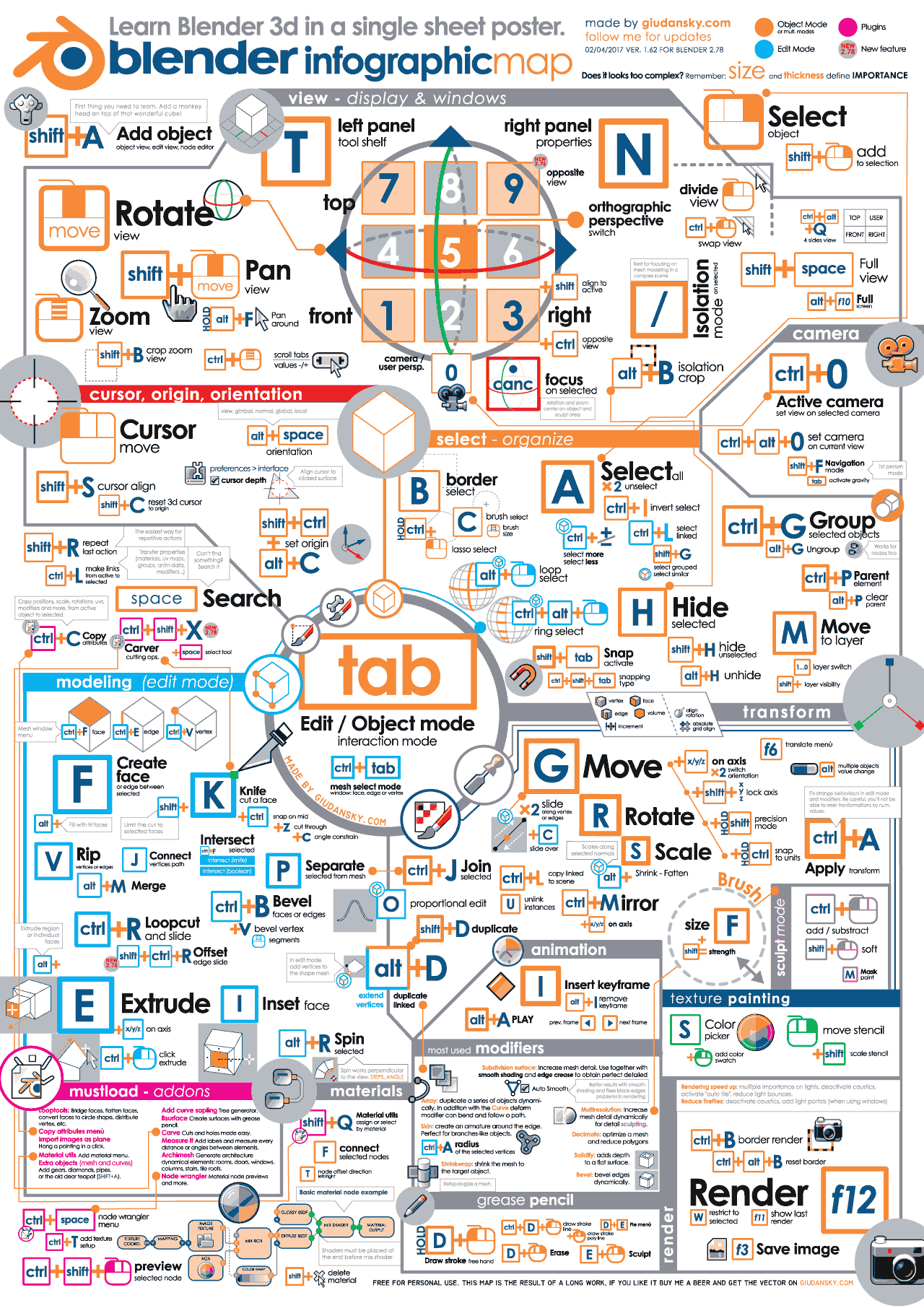
This is almost as bad as the Blender one I saw on reddit a few days ago.
I bet this is the one you refer to:
http://giudansky.com/images/articoli/2016/11/blender-infogra...
At a glance it looks quite bad, but if you actually learn Blender it's probably useful.
http://giudansky.com/images/articoli/2016/11/blender-infogra...
At a glance it looks quite bad, but if you actually learn Blender it's probably useful.