I haven't used this program specifically but I'm using an OK one (called "Take a break") and credit it with letting me look at screens again.
A few years ago my eyes would dry out within a few minutes of using a screen. I tried eye drops, resting my eyes, taking longer breaks, etc... which didn't work.
I did some research and there's something called the 20-20-20 rule which means looking at something at least 20 feet away for 20 seconds every 20 minutes. I found this app and it fixed my issues. Turns out the issue is your eye not changing what it's focusing on.
Highly recommend trying it even if you're not actively experiencing issues.
Your app looks a lot nicer than the one I'm using so I'll give it a try!
Thanks. I've tried using Satori but I'm curious if you've used it to draw graphs specifically. E.g. Satori expects JSX / doesn't support HTML strings from d3-node with dangerouslySetInnerHTML.
Does anyone have a similar solution for drawing graphs / charts in a Node environment without a browser dependency? Last time I explored this I couldn't find any good solutions.
I was curious how Igalia was funded and this was a surprisingly good interview on how they’re structured, how they work with the major browser companies, etc… Apparently many Apple, Google, Firefox engineers left to work for them.
I think you're actually misunderstanding what david38 and Retric are discussing. They're saying they're in agreement and that the US and Central America are similar, but not "equally bad".
Thanks! Yeah I've seen a few similar projects (particularly written Java which I wasn't excited about). That looks like a nice project. It's written in Python and says it can take from an hour to several days depending on the computer and they don't recommend running it on a Mac.
I don't have up-to-date benchmarks but my project is written in Go and everything was designed to be as highly parallel as possible, broken up into multiple pipeline steps (splitting the Wiktionary dump, lexing, parsing, resolving, etc...) with a high emphasis on performance so I would assume it's faster but would need to do a head-to-head test.
I saw a few posts discuss using the Wiktionary dump directly vs. the freeDictionary API, which is difficult to do because the raw wiki text isn't immediately usable. I actually created and open sourced a project several years ago that I never publicized that lexes and parses the Wiktionary dump:
Specifically it can understand and execute 21 different wiki text templates (e.g. "cog", "borrow", "gloss", "prefix", "qualifier”), e.g. {{inh|es|la|gelātus}}:
And eventually parse it into this structure, which has a list of all definitions (distinguished into nouns, adjectives, verbs, adverbs, etc...), etymology, links, and descendants for a given word:
Further parts of the pipeline turned different relationships into edges that I could stick into a graph database and do certain graph queries. This allowed me to do certain queries like find French, Spanish, and English words that share a Latin root.
I ended up parallelizing this specific query using Apache Beam and then dumping the results into Firestore so they could be queried via a web app. Here's an example for the Spanish word: helado
Under the "Cognates" section, it knows that it comes from the Latin root "gelatus" from which English has borrowed the word "gelato".
I originally started this project when I was learning Spanish. If you just look up the definition of helado (ice cream) it doesn't necessarily help you learn it. But I found that if I could relate it to languages I already knew (e.g. English and French), it was easier to remember. In this case helado is related to gelato, but you won't find that in e.g. Google Translate or SpanishDict.
Ultimately, I found that while the Wiktionary data is amazing, it’s also a bit of a quagmire for finding cognates. I would miss certain etymologies where you had to follow a descendant tree 2 or 3 levels deep. Or a definition would just mention a word it was related to. But if I expanded the query to include these instances, then it significantly increased the amount of non-cognates that showed up in the results.
So I created a useful set of tools (which I never wrote about until now), but I realized the end result of a web UI that showed the relationships between words would require a significant investment in data quality that likely wasn’t possible without changing Wiktionary itself / community investment.
I just want to plug Playwright by Microsoft as I've been using it over the past month and have had a really great experience with it: https://playwright.dev
It's built by the founders of Puppeteer which came out of the Chrome team. Some things I like about it:
1. It's reliable and implements auto-waiting as described in the article. You can use modern async/await syntax and it ensures elements are a) attached to the DOM, visible, stable (not animating), can receive events, and are enabled: https://playwright.dev/docs/actionability
2. It's fast — It creates multiple processes and runs tests in parallel, unlike e.g. Cypress.
3. It's cross-browser — supports Chrome, Safari, and Firefox out-of-the-box.
4. The tracing tools are incredible, you can step through the entire test execution and get a live DOM that you can inspect with your browser's existing developer tools, see all console.logs, etc...
5. The developers and community are incredibly responsive. This is one of the biggest ones — issues are quickly responded to and addressed often by the founders, pull requests are welcomed and Slack is highly active and respectful.
My prior experience with end-to-end tests was that they were highly buggy and unreliable and so Playwright was a welcome surprise and inspired me to fully test all the variations of our checkout flow.
I did, but only very briefly. I originally wasn't looking for an E2E tool but was evaluating another tool for a different problem (Nx) which included Cypress as part of its opinionated defaults.
Cypress was a surprisingly nice experience as well and led me to research other modern e2e tools. Most of the points above can be compared against Cypress — Playwright supports parallel execution of tests within the same file on the same machine, which Cypress doesn't, and so is much faster. Cypress doesn't use modern async / await syntax. Due to its architecture, Playwright can test across tabs, work with iframes easily, which Cypress can't.
The UI for Cypress's developer tools is nice, but... as I said, Playwright's tracing UI is really excellent and the documentation is also really well done. This is also a personal thing, but I trust tools that came out of browser teams (Chrome) to emulate browsers in a more efficient way, e.g. spinning up cheap, isolated browser contexts in Chrome, the details of waiting for an element to be ready, etc...
I just want to plug Playwright by Microsoft as I've been using it over the past month and have had a really great experience with it: https://playwright.dev
It's built by the founders of Puppeteer which came out of the Chrome team. Some things I like about it:
1. It's reliable and implements auto-waiting as described in the article. You can use modern async/await syntax and it ensures elements are a) attached to the DOM, visible, stable (not animating), can receive events, and are enabled: https://playwright.dev/docs/actionability
2. It's fast — It creates multiple processes and runs tests in parallel, unlike e.g. Cypress.
3. It's cross-browser — supports Chrome, Safari, and Firefox out-of-the-box.
4. The tracing tools are incredible, you can step through the entire test execution and get a live DOM that you can inspect with your browser's existing developer tools, see all console.logs, etc...
5. The developers and community are incredibly responsive. This is one of the biggest ones — issues are quickly responded to and addressed often by the founders, pull requests are welcomed and Slack is highly active and respectful.
My prior experience with end-to-end tests was that they were highly buggy and unreliable and so Playwright was a welcome surprise and inspired me to fully test all the variations of our checkout flow.
One of the main benefits is that it doesn’t require the internet and can synchronize iPhones, iPads, and Apple TV’s using either peer-to-peer WiFi or Bluetooth with no manual pairing.
Also had an interval timer for exercises, group activities, etc...
One benefit I've taken more advantage of, that I've found a lot of people aren't familiar with is the concierge service. You can call or email them (which is now my preference).
In addition to some obvious things like finding a hotel or calling a car rental agency on my behalf (being able to send a quick email is significantly more convenient than waiting on hold for an hour) they've...
1. Helped me find an air conditioner along my driving route in CA when they were mostly all sold out. This took place over 48 hours. They would give me updates every 6 hours either via email, phone, or both.
2. Called several bike repair shops with information that was important to me — turnaround time, walking distance, price, etc...
3. Researched comparative information on model years of a car I was thinking about buying. E.g. 2017 adds these features, 2018 has these changes from 2017, etc...
4. I've called them to see if there are any road closures or issues with my route while driving.
As mentioned below, the card is really $250 a year or roughly $20/month and is it worth it for this benefit alone. I've used Magic ($35/hr...) and Fancy Hands and I've actually found the service to be superior. And I don't have to worry about the amount of time they spend.
From what I can tell they have what seems to be employed professionals who answer the phone (and maybe the initial emails) who are very personable and knowledgeable and then farm out a lot of the actual grunt work to different researchers. While the quality I've gotten from Fancy Hands / Magic has been much lower in terms of actually understanding what I'm asking for. Seems to be more college students / gig workers.
That's separate from the very good car rental insurance... DashPass (no delivery fees, reduced fees), 10X Lyft points. And things like extended purchase and warranty protection which I haven't used yet.
Some really beautiful pieces. Some unsolicited advice... if you haven't already considered Etsy (I used to work there) it can be a great place to sell your work.
I've bought a lot of furniture (some custom) on Etsy and people have been surprised by that / think there isn't necessarily high quality work there.
In addition to the larger pieces, if you have work that's easily repeatable you can make a lot with e.g. tissue boxes or cutting boards, etc...
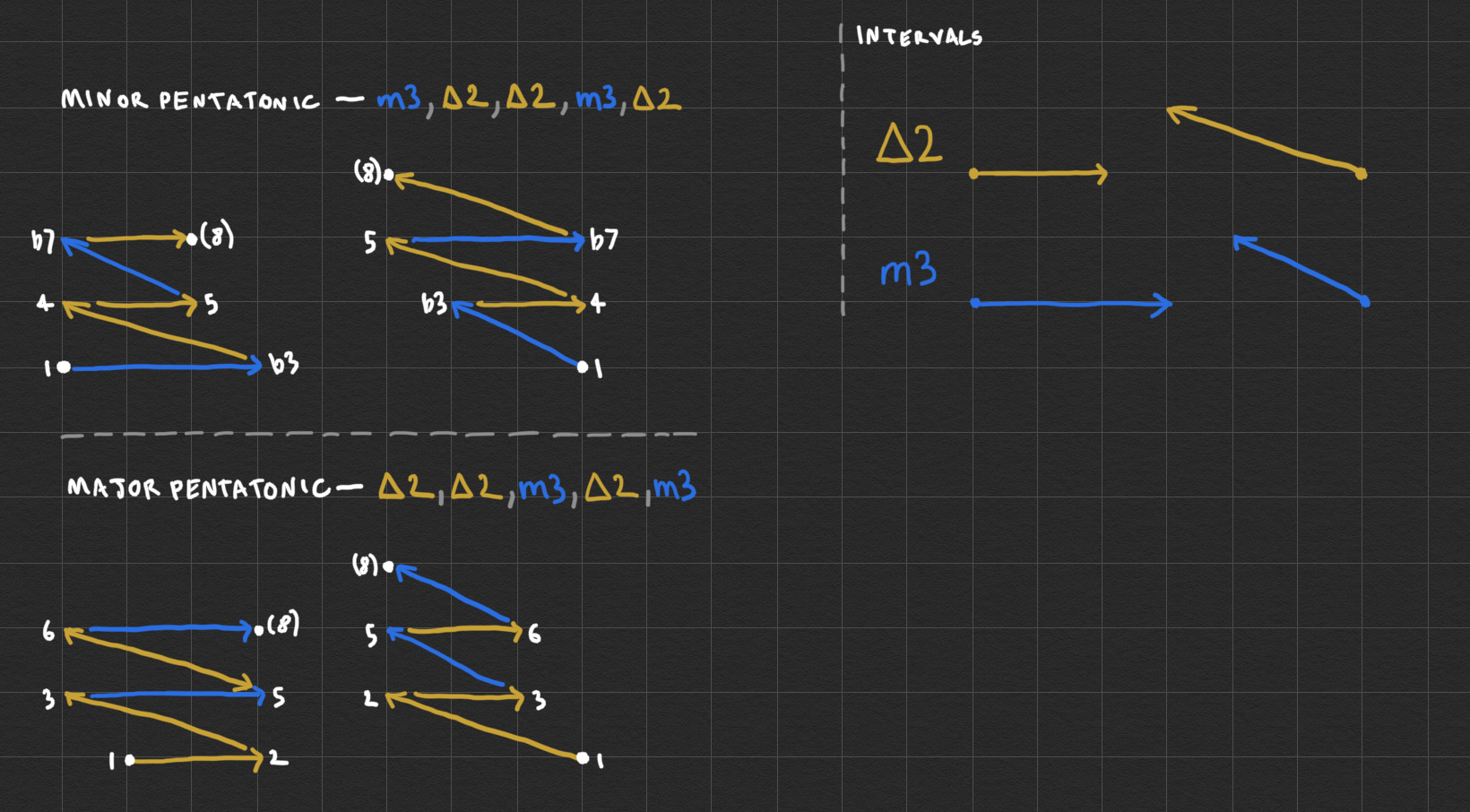
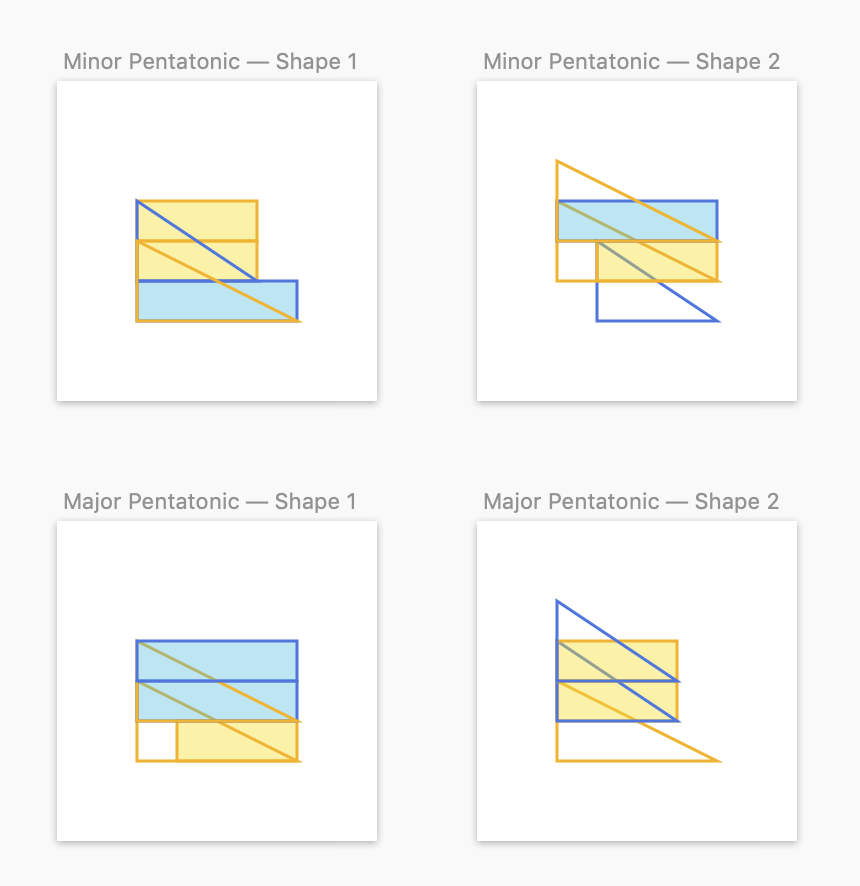
Since we're sharing... I started a project a while ago whose goal was to show how intervals could be visualized horizontally or vertically and then "stacked" or composed in different ways to create scales and chord shapes up and down the fretboard.
I didn't end up finishing the project but created some fun visuals...