When I had this issue, it was fixed by disabling and removing the speech-dispatcher. Something to do with text to speech (I never use it but is sure to be a pain if you do need it) automatically doing things that corrupt the audio stream globally.
It does seem that way, however, in none of the AdaBoxes I've gotten from them have I had to sign up for their cloud services. That's where you think they would push it hard, but it just hasn't happened and I'm glad for that. There are usually a few samples that make use, but you always have the option to roll your own code on it and use their base libraries for interfacing with the hardware. It will be a sad (and probably disastrous) day when they bind their code to require cloud services especially considering some micros don't have wifi.
Neat. I'd love to see what that looks like (raytracer or cradle). Found an old Hack a Day from 2014 (https://hackaday.com/2014/11/25/ray-tracing-on-an-arduino/) where someone is raytracing on a 16Mhz micro. Should be faster on the 120Mhz portal, but it took almost 3 days :P
Adafruit offers a starter kit with a microcontroller, 64x32 led matrix, and some other doodads for ~$70 (https://www.adafruit.com/product/4812). It's really easy to tinker with. I made a clock that does some crappy visualizations and open sourced it here: https://github.com/kruffin/matrix_portal_gol It actually looks a lot like this Tidbyt (a box with a dot matrix).
The only thing it doesn't have is a RTC, so I just polled a time server every so often.
My favorite from that collection on map generation is by Herbert Wolverson: https://www.youtube.com/watch?v=TlLIOgWYVpI He goes over 5 or 6 different techniques that are easy to implement.
This may interest you; might not be what you were asking for. I haven't built one, but keep an eye on it and dream of free time to surface mount solder and poke around with it. The repo used to have a cost estimate and think it came out to around $100 but my memory may be fuzzy.
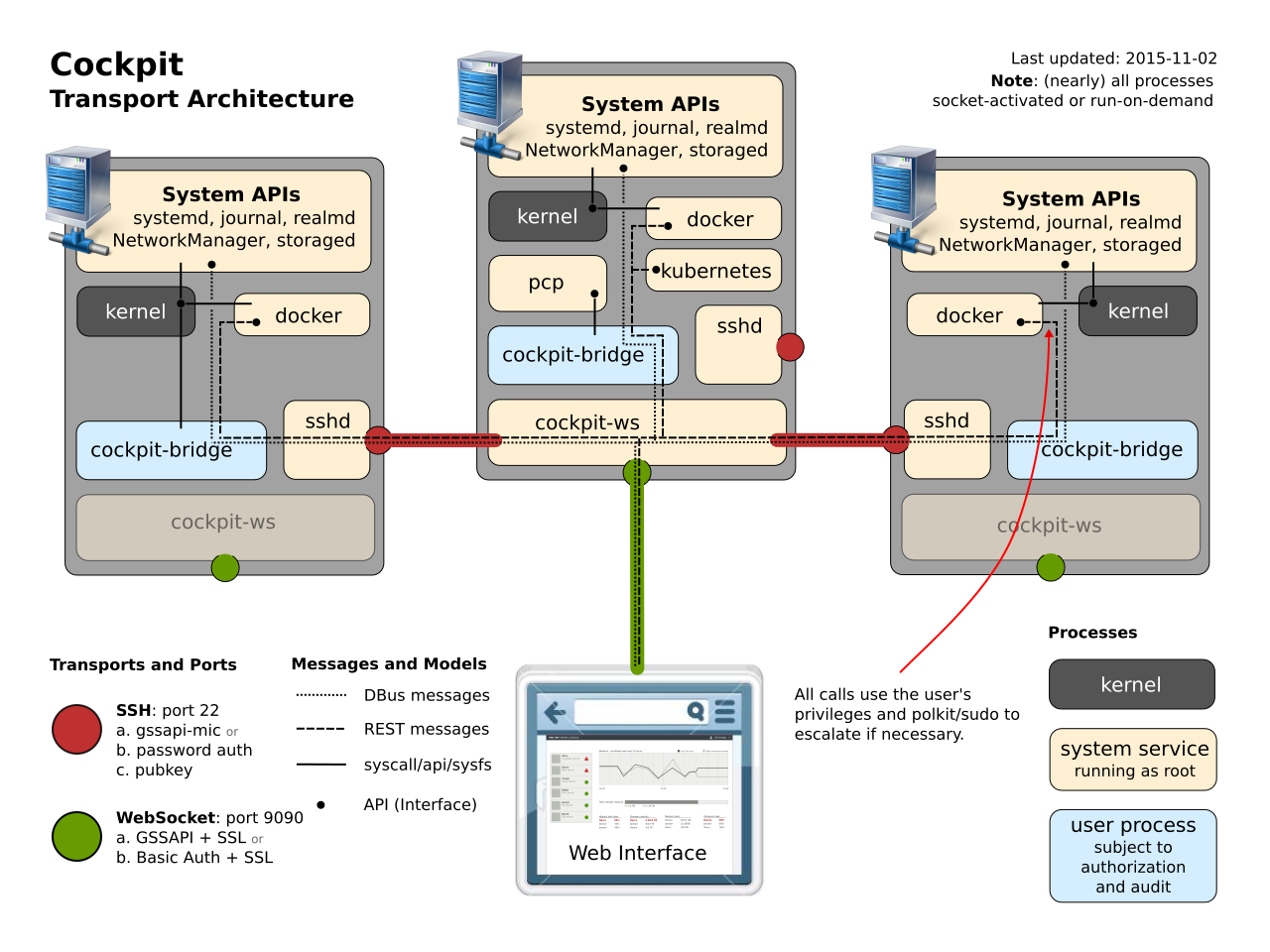
Reading again, it does look like the installation is limited in some way if you choose to use public keys and your user doesn't have the privileges (without sudo) necessary for some of Cockpit's commands it tries to run.
Note that when a user is authenticated in this way [public key] the authentication happens without a password, as such the standard cockpit reauthorization mechanisms do not work. The user will only be able to obtain additional privileges if they do not require a password.
You are right, I missed the one liner above this that stated it needed one of these methods: [password, kerberos, or public key].
However, it does sound like if you use the docker image that you need password logins on the primary machine unless you modify the docker image to add a public key. I may just be reading wrong again though.
Why does it require that the server has password logins enabled? This seems contrary to every "secure your server" guide I've seen and opens your server up to the password guessing game. It seems like a cool product, but that's a huge non-starter.
The target server will need to have password based authentication enabled in sshd. When this is setup for the first time, Cockpit will ensure that the user connected to primary server has the same password on the secondary server.
Just wanted to say a big thank you for this site. I used it when trying to figure out how to hook up an RFID reader to the Pi. It was suprisingly hard to find the pinout, but finally found your site. This is what I put together: https://bitbucket.org/kruffin/rfid_play
What you've said can and does work for telling time, but from watching a few of their videos it looks like the watch part of this device is a secondary function. It connects to your phone and will display the caller's name or text messages like other smart watches, but in braille. I can't read braille, so don't know how effective that is with the limited space. It would be interesting to hear from a blind person what their current state of electronic connectedness is since this type of device is supposed to improve the parity between blind and non-blind individuals.
One of the cooler things mentioned in one of the videos (https://www.youtube.com/watch?v=zmpl81WmFSo) was that they developed their own magnetic actuators that are a 10th of the cost (if you believe the marketing) of existing ones. I haven't verified any of those claims, but if true does mean their braille tablet could be an affordable reality.
More recently self
-
assembled nanogratings produced by ultrafast laser writing in
glass were proposed for the polarization multiplexed optical memory,
where the information encodi
ng would
be realized by means of two birefringence parameters, i.e. the slow axis orientation (4th dimension) and
strength of retardance (5th dimension), in addition to three spatial coordinates
[3,4]
.
As an additional data point, a former client (female) addressed our mixed-gender team as gals. This is something the article explicitly calls out as taboo. It didn't bother me (male) at all nor did it seem to alienate anyone on the team.
Disclaimer: I use "guys" as mixed gender a lot and this slack bot would really piss me off; the opposite of "valuing, respecting, and supporting the needs of every individual".
You use a breakout board to get the connector you need to hook it up to your computer. So for the 5v mini you would get something like this: https://www.sparkfun.com/products/9716
You then either solder on some headers and connect it to the breakout, program it, and then disconnect it when done or do some funky alligator clip madness to connect the breakout to the arduino.
Note that the pro already has the pins waiting for the breakout to be connected.
You'll want an Arduino that has headers and a usb connector already soldered on and the usb cable to fit it. That's really the bare minimum. From the article, this one looks like it would fit: https://www.sparkfun.com/products/11575 and only $9 on sale day.
Now if you want it to do something you can see other than in the logs from within the IDE, that's when you start needing more stuff. Generally a breadboard, wires, and some components like leds and resistors come next; for making blinking lights, who doesn't like those?
As far as the computer, it can be best answered here but is just about anything you have: http://arduino.cc/en/Guide/HomePage in the getting started section.
https://tqdev.com/2021-firefox-ubuntu-crackling-sound