Dell removed Fn+Left/Right for Home/End from all its products(twitter.com)
twitter.com
Dell removed Fn+Left/Right for Home/End from all its products
https://twitter.com/chrismarschall1/status/1407257059280703489
20 comments
Just suffering from this Home/End issue myself after changing to a new Dell laptop.
I didn't expect a company like Dell to make such a basic mistake.
The web is full of people asking them to fix this in their BIOS, going back for a year now, but it seems Dell is not hearing their customers or has no intention to fix this...
Examples:
https://www.dell.com/community/XPS/XPS-15-change-Home-and-En...
https://www.dell.com/community/XPS/Please-re-map-Fn-Left-and...
https://www.dell.com/community/XPS/XPS-13-9300-Map-fn-left-a...
https://www.dell.com/community/XPS/Control-Home-Control-End-...
I have both a 9570 and a 9550, and both have "home"/"end" printed on the left/right keys and work as you would want.
The current XPS on the Dell web site has "home"/"end" printed on the F11/F12 keys. So it seems like a conscious choice of theirs (right or wrong) and not a bug for them to fix.
Is there a BIOS update or something I should avoid that takes the older XPS models and changes their home/end to conflict with what's printed on the keyboard?
The current XPS on the Dell web site has "home"/"end" printed on the F11/F12 keys. So it seems like a conscious choice of theirs (right or wrong) and not a bug for them to fix.
Is there a BIOS update or something I should avoid that takes the older XPS models and changes their home/end to conflict with what's printed on the keyboard?
I don't expect Dell to change the mapping on older models to be in conflict with the printed label.
But if you're a heavy user of Fn+Left/Right for Home/End, you might want to consider a different brand than Dell to succeed your XPS.
Also, I don't think anyone called it a bug, it's rather an 'issue' (except the problem described with the external Dell-keyboard, which indeed sounds like a bug...)
Also, I don't think anyone called it a bug, it's rather an 'issue' (except the problem described with the external Dell-keyboard, which indeed sounds like a bug...)
this appears to be the answer. I mean, you're correct, and I sincerely hope that all these people complaining do indeed have "Home" and "End" printed on the arrow keys, and not on F11 and F12, where they appear to be on current models.
it's definitely not a firmware issue if the labels are not printed on the arrow keys.
it's definitely not a firmware issue if the labels are not printed on the arrow keys.
Disagree. It's Dell's decision if they want to screw around with the key-arrangement, but there would have been zero issue for them to keep Home/End also mapped on the arrow keys to keep at least some consistency.
I actually use a Bluetooth keyboard right now which has nothing printed on the arrow keys and still works as Home/End with Fn+Left/Right. Even Apple has keyboards with dedicated Home/End keys and still keeps the mapping also on Fn+Left/Right.
So yeah, it's not a bug, but it's still a usability issue in their keyboard firmware they should fix
it is definitely not a firmware big if it was an intentional decision.
it's not a usability issue, either. yes, it sucks that the keyboard layout changed, sure. and, you're a human, right? a member of the most adaptable species ever known? yes. yes, you are. you can handle retraining some muscle memory.
early in my career, every single computer I used had a different keyboard layout. every. single. one. at most it was a very mild inconvenience.
it's not a usability issue, either. yes, it sucks that the keyboard layout changed, sure. and, you're a human, right? a member of the most adaptable species ever known? yes. yes, you are. you can handle retraining some muscle memory.
early in my career, every single computer I used had a different keyboard layout. every. single. one. at most it was a very mild inconvenience.
If you’re switching between computers a lot, it can be difficult to adapt. I use macOS, Windows, and Linux daily, and the difference between Command on macOS and Control on the other two still throws me off every time.
Fn + arrow keys has become something of a convention; it works even when not explicitly printed on the keycaps.
Fn + arrow keys has become something of a convention; it works even when not explicitly printed on the keycaps.
I think I will have to stop buying Dell laptops now too unfortunately. This is hostile, like the bad keyboards Apple used to make and the still useless touchbar.
At least my old Alienware has PgUp/Dn keys above left/right, and standalone home/end next to F12 (silly place).
I was hoping to upgrade, but I guess Lenovo and others will have to do. I just want an OLED screen, upgradeable RAM to at least 32G, two M2, a discrete GPU, Thunderbolt 3/4 and... Now a keyboard with Fn-arrows or discrete cursor keys.
At least my old Alienware has PgUp/Dn keys above left/right, and standalone home/end next to F12 (silly place).
I was hoping to upgrade, but I guess Lenovo and others will have to do. I just want an OLED screen, upgradeable RAM to at least 32G, two M2, a discrete GPU, Thunderbolt 3/4 and... Now a keyboard with Fn-arrows or discrete cursor keys.
Well, Dell has Home/End keys on Fn+F11/F12, so if you're fine with the old Alienware laptop of yours you might get accustomed to the new Dell as well.
I had several generations of Mac/PCs with Fn+Left/Right/Up/Down mapped to Home/End/PgUp/PgDn, and now after upgrading my XPS-13 the new Gen11 model that workflow is suddenly broken...
Check out gigabytes aero line. Got one a few years ago and it's still going strong. All that and it's got an RJ45
Buying a Dell is not a mistake I am going to repeat.
They were good up to maybe 4 years ago, but since then their top of the range hardware is bad and their support worse.
They were good up to maybe 4 years ago, but since then their top of the range hardware is bad and their support worse.
Their latitude 7000 series is still probably the best windows laptop out there.
Well, the Gen11 Latitude 7420 now has the same updated Dell keymap, with Home/End on Fn+F11/F12 and Fn+Left/Right probably mapped to nothing (like on the Gen10/Gen11 XPS).
Maybe it can be fixed with custom ACPI tables or a custom kernel driver?
Try running acpi_listen and pressing an Fn+something combo to see if it's ACPI-based. If so, it's a relatively easy fix by disassembling the ACPI tables, altering them and then using a bootloader that can replace the tables like I think grub supports (or if running Linux using kernel parameters to replace them).
Try running acpi_listen and pressing an Fn+something combo to see if it's ACPI-based. If so, it's a relatively easy fix by disassembling the ACPI tables, altering them and then using a bootloader that can replace the tables like I think grub supports (or if running Linux using kernel parameters to replace them).
Dell also removed trackpoint and all touchpad buttons, and made up/down arrow keys half height on the new Latitude laptops.
These are not the changes one would expect to see in a professional-grade laptop. On the other hand, the Lenovo line looks good in this regard.
These are not the changes one would expect to see in a professional-grade laptop. On the other hand, the Lenovo line looks good in this regard.
The best key arrangement in a laptop I have used was on HP Elitebook. All the keys were present: Insert, Delete, Home, PageUp, PageDown. The Up and Down arrow keys were half-height, that's the only problem I had with it. The worst I have ever used is Macbook Pro. It doesn't even have a delete key! And they mislabeled the backspace key as "delete" for some reason.
> The worst I have ever used is Macbook Pro. It doesn't even have a delete key!
It does but you have to use Fn with the delete key.
It does but you have to use Fn with the delete key.
FYI, you can (could? I dunno now, don't use an MBP any more...) use Cmd+Backspace to simulate a Delete key.
In my five-ish years of using a Macbook Pro though, I could never get used to this in muscle memory.
In my five-ish years of using a Macbook Pro though, I could never get used to this in muscle memory.
I want to run a laptop brand.
There is simply none normal laptops left on the market for pro users.
There is simply none normal laptops left on the market for pro users.
How do you feel about system76 laptops? I've been eyeing their products in case I need a laptop in the future. As open source as they can be, down to the firmware. A bit on the expensive side but I would be okay with that to support a company that seems to be working towards bettering the industry.
System 76 are just various rebranded OEMs with official Linux support. I'd say the are nothing spectacular in parts choice, nor engineering.
Very cost-centric like virtually all OEM space is.
Very cost-centric like virtually all OEM space is.
Depends on the budget I guess,
https://www.lenovo.com/us/en/laptops/thinkpad/thinkpad-p/c/t...
https://www.asus.com/Laptops/For-Creators/ProArt-StudioBook/...
https://www.lenovo.com/us/en/laptops/thinkpad/thinkpad-p/c/t...
https://www.asus.com/Laptops/For-Creators/ProArt-StudioBook/...
I am sceptical of ASUS's current claims in high-end. They tend to come, and go from a niche.
I recently saw their two screened laptop, build quality was superb, as was the rest of hardware BOM, and original engineering.
For Lenovo, I see the same disease that claimed Dell before The "PRODUCT MANAGEMENT."
They had an excellent XPS line, and then they started to slice stuff off it every new model. Now it's very bog down commodity hardware underneath:
1. Low spec memory
2. Qcomm low-end WiFI/bt which bugs out even in Windows.
3. Low-end SSD
4. Batteries going down from 68Wh to 52Wh in the 13th
5. Panel went from top tier one, to noname low-end ISP with <300nits brightness. Only 4k panel now is above average for the class.
6. Testing, and engineering down the drain: mutual RF interference kills WiFi, BT, PCIe, TB, USB3.
For Lenovo, it's of course not the ThinkPads of old. For P15 line is experiencing the same "fade," like a decision to fit P15s with 3 cell battery.
I recently saw their two screened laptop, build quality was superb, as was the rest of hardware BOM, and original engineering.
For Lenovo, I see the same disease that claimed Dell before The "PRODUCT MANAGEMENT."
They had an excellent XPS line, and then they started to slice stuff off it every new model. Now it's very bog down commodity hardware underneath:
1. Low spec memory
2. Qcomm low-end WiFI/bt which bugs out even in Windows.
3. Low-end SSD
4. Batteries going down from 68Wh to 52Wh in the 13th
5. Panel went from top tier one, to noname low-end ISP with <300nits brightness. Only 4k panel now is above average for the class.
6. Testing, and engineering down the drain: mutual RF interference kills WiFi, BT, PCIe, TB, USB3.
For Lenovo, it's of course not the ThinkPads of old. For P15 line is experiencing the same "fade," like a decision to fit P15s with 3 cell battery.
Aa someone who's been using a Surface Book, I gotta disagree. Battery is a bit shit but otherwise it is equal or superior to my MBP in every way. It is also the only pro-grade laptop I've ever used that doesn't get hot. You can actually use this thing on your lap
Some shitty gateway laptops always require the FN key for function keys to not be media keys. A real problem if you rely on keyboard shortcuts.
Better laptops have a modifier in the BIOS to toggle the top row = media keys / Fn + top row = F1-F12 settings. Obnoxiusly nowadays the default is the media keys...
On my Asus laptop this is toggleable by pressing Fn+Esc, so now the Fn-key constantly has a light on to let me know that my top row is F1-F12.
On my Asus laptop this is toggleable by pressing Fn+Esc, so now the Fn-key constantly has a light on to let me know that my top row is F1-F12.
Gateway locked the bios and refused to send a firmware update to unlock.
I will never understand why laptop keyboards always have to be unique, and uniquely terrible. Trying to type on an unfamiliar laptop is needlessly troublesome.
Because there's no room for a standard full-size keyboard, so they need to get creative in how to fit some keys or omit others. They also need to differentiate themselves, so they can't simply adopt a keyboard design from a competitor.
> they can't simply adopt a keyboard design from a competitor
why can't they all standardize?
the worst hallucination that hardware and software manufacturers have is that they "need to add unique value" or just that they "need to add value" at all.
I DO NOT care for any vendor-specific crap on the laptop. I do not buy a laptop for any of those things. I do not want a vendor-specific driver updater when Windows Update already does that. or, would, if the vendor published their drivers there. I do not want vendor-specific wallpaper. I do not want any of the bundled software. ever. No one ever buys a specific laptop to gain access to those things. No one.
businesses often choose a single manufacturer for most deployed hardware to make administration easier, and none of them choose their vendor based on those admin tools. they choose based on price, features, and warranty terms.
"we need to add value".... no, you need to stop ruining things in the name of value.
why can't they all standardize?
the worst hallucination that hardware and software manufacturers have is that they "need to add unique value" or just that they "need to add value" at all.
I DO NOT care for any vendor-specific crap on the laptop. I do not buy a laptop for any of those things. I do not want a vendor-specific driver updater when Windows Update already does that. or, would, if the vendor published their drivers there. I do not want vendor-specific wallpaper. I do not want any of the bundled software. ever. No one ever buys a specific laptop to gain access to those things. No one.
businesses often choose a single manufacturer for most deployed hardware to make administration easier, and none of them choose their vendor based on those admin tools. they choose based on price, features, and warranty terms.
"we need to add value".... no, you need to stop ruining things in the name of value.
Dell XPS 9570 still working. But I'm waiting for my new XPS 9510 and it would be very frustrating not have fn+arrow key combo working as before
well, the tweet mentions explicitly XPS-15 9500.
As 9510 is mainly a refresh of 9500 (Intel Gen10->Gen11 platform), with the same keyboard, I would expect the same issue to be there as well...
I upgraded from a XPS-13 9350 to a new Gen11 9310, just to find that Fn+Left/Right has no effect and Home/End buttons are now on Fn+F11/F12 (which is pretty much useless at least in my coding workflow...).
Not sure yet what I'll do. I like the form-factor, but I might have to send it back and buy a different brand instead...
The keyboard on the 9510 is not the same part number as on the 9500 but the layout is the same. The only difference I remember is that the power button / fingerprint reader on the 9510 can be pressed, otherwise the layout is the same. The home/end keys are on the F11/F12 but it's their primary function (push Fn. to use F11 and F12), same as on the 9500.
My work laptop is a 9570 and my personal laptop is the 9500. I have a relatively easy time switching back and forth between the two but I do prefer the home/end setup of the 9570.
My work laptop is a 9570 and my personal laptop is the 9500. I have a relatively easy time switching back and forth between the two but I do prefer the home/end setup of the 9570.
If it ain't broke, a product manager will justify their position by making it so.
My daily driver is a ThinkPad Carbon X1. It has half-height arrow keys and PgUp/PgDn in the free corners (see [1] for a photo). Home/end are in a place where they are unreachable without looking (top row, right of F12).
I remapped: - PgUp is Home, PgDown is End - Top-right keys on the keyboard are PgUp/PgDn because I use them all the time and can easily place my fingers there without taking eyes off the display. In this case this means that Ins -> PgUp and Del -> PgDn. - PrScr (which for some reason Lenovo decided to place between right Alt and right Ctrl) is now Del. Nearby and easy to reach (blindly). - Old Home/End now serve as Ins/PrScr because these are rarely used.
Now, if only I could find some custom keycaps somewhere. :)
[1] https://manofmany.com/wp-content/uploads/2020/05/ThinkPad-Tr...
I remapped: - PgUp is Home, PgDown is End - Top-right keys on the keyboard are PgUp/PgDn because I use them all the time and can easily place my fingers there without taking eyes off the display. In this case this means that Ins -> PgUp and Del -> PgDn. - PrScr (which for some reason Lenovo decided to place between right Alt and right Ctrl) is now Del. Nearby and easy to reach (blindly). - Old Home/End now serve as Ins/PrScr because these are rarely used.
Now, if only I could find some custom keycaps somewhere. :)
[1] https://manofmany.com/wp-content/uploads/2020/05/ThinkPad-Tr...
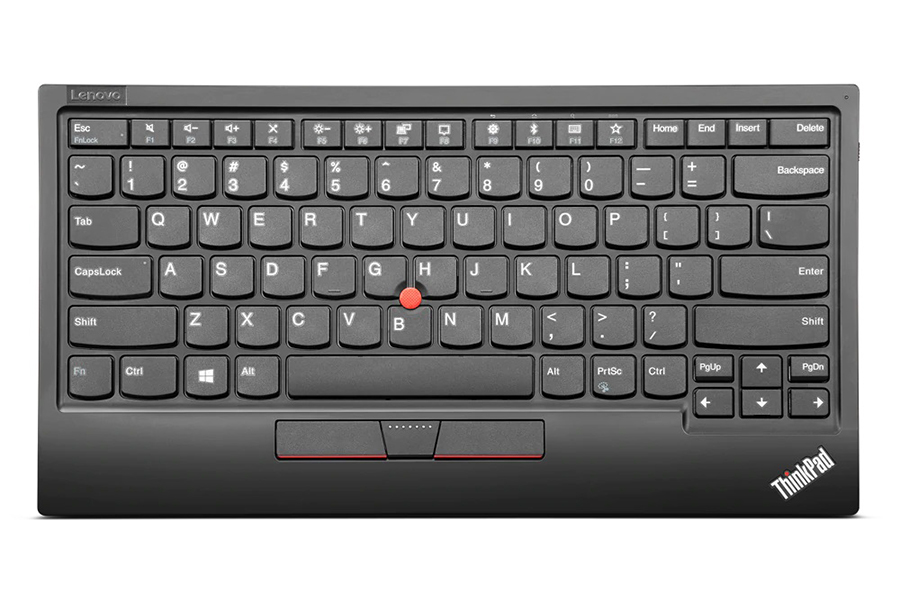
Same here. I have a script to remap PgUp/Dn with Home/End but only on the internal keyboard. USB keyboards still have the normal setup.
For me it's even more complicated cause I use Colemak.
For me it's even more complicated cause I use Colemak.
Inspiron 14 7000 has home/end at F11/F12 spots. And I had to follow some strange instructions to hack to BIOS to make the SSD available in Linux. It has Ubuntu on it now and it's OK.
https://www.dell.com/community/Linux-General/Inspiron-7490-B...
https://www.dell.com/community/Linux-General/Inspiron-7490-B...
This wouldn't help for when in the BIOS,
but when running Windows/Linux I wonder if a tool like kmonad could be used work-around the problem (albeit, not with the Fn key):
https://github.com/kmonad/kmonad
Exactly, not useful for this case because the Fn-key combos send no event that could be mapped, for the OS it's like no key was pressed at all...
And for Left/Right button, all other toggle-combos (Ctrl, Shift, Alt) are already natively in use and needed, so also not an option to remap them in Windows.
Dell needs to patch their BIOS to fix that properly...
I had no idea this was a common keybind. Tried this on my own laptop and it worked. What is the advantage that people feel it gives? Closer to the home row?
I use Fn+Arrows to move around and edit code or large text without repositioning my hands.
Combined with Shift and/or Ctrl you get really fast in modifying text, as you only switch both hands blindly between "navigate/select" position and "write" position.
Examples:
You start modifying a long sentence and realize that you need to rewrite the text after your cursor?
--> Shift+Ctrl+Right let's you quickly select words, Shift+Fn+Right selects the whole line to your right. The next keystroke will replace everything you just highlighted with your new input.
Need to add a line of code above/below the line you just modified?
--> Fn+Right, then Enter, to start a new line below the cursor.
--> Fn+Left, then Enter, to start a new line above the cursor.
Combined with Shift and/or Ctrl you get really fast in modifying text, as you only switch both hands blindly between "navigate/select" position and "write" position.
Examples:
You start modifying a long sentence and realize that you need to rewrite the text after your cursor?
--> Shift+Ctrl+Right let's you quickly select words, Shift+Fn+Right selects the whole line to your right. The next keystroke will replace everything you just highlighted with your new input.
Need to add a line of code above/below the line you just modified?
--> Fn+Right, then Enter, to start a new line below the cursor.
--> Fn+Left, then Enter, to start a new line above the cursor.
Just set up whatever is equivalent to karabiner elements on PC/Linux and be on your way.
I don't get it can't you just remap this using auto hotkey if you care that much
No, the fn key combinations need to be handled in the BIOS in most (all?) laptops. Fn is not a "standalone" modifier like ctrl.
Exactly, the Fn-key itself is not sending a modifier key-event to the upper layers, so if ex. Fn+Left/Right is not triggering the BIOS to generate some dedicated key-event (ex. translating it into a Home/End key), a keyboard mapping tool in the OS receives only the Left/Right key-event...
there was an xkcd comic on this issue:
https://xkcd.com/1172/
Thing is, does Dell owe customers' workflow any consideration?
https://xkcd.com/1172/
Thing is, does Dell owe customers' workflow any consideration?
why dell .. why ??